Welcome back to Build of the Week. In this series, we pull back the curtain on the most impressive applications built entirely using the Mayson Full-Stack AI Agent. We aren't looking at demos. We are dissecting live, deployed, production-ready software that solves real problems — or in this case, creates something genuinely beautiful.
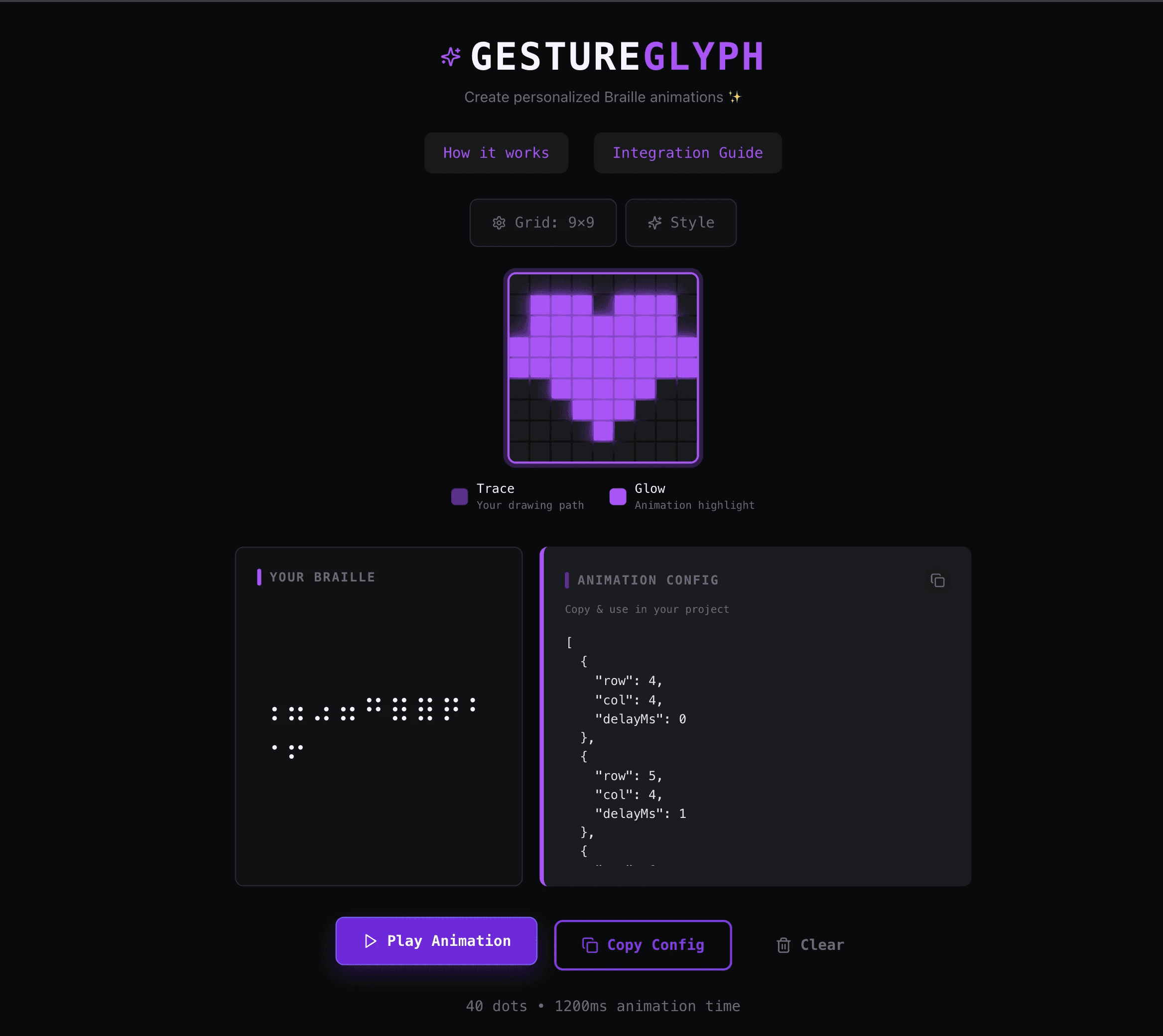
This week, we're featuring GestureGlyph — a browser-based tool that turns hand-drawn gestures into animated Braille patterns you can export and embed anywhere.
Try it live: gestureglyph.mayson.app
The Challenge: Where Art Meets Accessibility Engineering
GestureGlyph sits at an unusual intersection. It is simultaneously a creative canvas tool, an accessibility system, and a developer utility. The creator set out to build something that felt like magic to use but was grounded in real engineering.
Three non-trivial problems had to be solved:
1. Gesture Capture on a Grid Canvas
The app renders a 9×9 interactive grid. Every tap or mouse movement on that grid has to be captured in real time — with enough precision to distinguish intentional gestures from noise. Building this kind of canvas input system cleanly, without lag or missed inputs, is a frontend engineering task that requires careful event handling, debouncing, and state management.
2. Braille Unicode Conversion in Real Time
The core mechanic of GestureGlyph is the instant mapping of drawn positions to Braille Unicode characters. Braille is a binary dot system — each character is defined by which of 6 or 8 dots are active in a specific cell. Translating a free-form user gesture on a grid into a valid, meaningful Braille pattern requires a conversion layer that understands the relationship between spatial position and dot encoding. This isn't a lookup table — it's an algorithm. Building it correctly, so that the output feels connected to what the user drew, is the kind of problem that takes a senior frontend engineer a full sprint.
3. Animation Sequencing and Export
GestureGlyph doesn't just display Braille characters — it animates them. The app plays back the drawing sequence as a frame-by-frame Braille animation, with configurable timing. And when the creator is done, they can hit "Copy Config" and get a clean JSON animation config — a portable, embeddable artifact they can drop into any loading screen, UI component, or creative project.
The Agentic Solution: One Prompt, One Complete System
The builder described the product at the intent level:
"Build a Braille animation creator called GestureGlyph. Users should be able to draw on a 9×9 grid canvas using mouse or touch. As they draw, the gestures should be converted to Braille Unicode characters in real time. The app should be able to play back the drawing as an animated Braille sequence. Users should be able to customise the animation style — colors, glow intensity, and themes. At the end, they should be able to copy a JSON config of the animation to embed it in any web project. The interface should be dark-themed and minimal."
The Mayson Agent didn't scaffold a shell. It built a working system.
The Canvas Engine
Mayson generated a fully functional gesture capture layer — mouse and touch event listeners wired to a stateful grid renderer. Each cell in the 9×9 matrix tracks activation state in real time. The rendering layer handles both pointer events and renders the grid faithfully, updating on every interaction without flicker or input loss.
The Braille Conversion Layer
The conversion algorithm maps the activated cells in the gesture grid to Braille Unicode code points. Each Braille character is a 6-dot or 8-dot matrix — and the engine correctly encodes which dots are active based on the user's drawn path. The result is shown live in the "Your Braille" panel: a real-time character output that tracks every stroke. This is not pattern matching. It is a functioning conversion engine.
The Animation System
When the user draws, every state change is recorded as a frame. The playback system sequences those frames with configurable timing — creating a smooth, animated Braille sequence. The "Play Animation" button triggers the frame loop. The output is visual, expressive, and genuinely striking.
The JSON Export
The "Copy Config" feature serialises the entire animation — frames, timing, style settings — into a single JSON object. Drop it into any web project and the animation plays. This is the developer-facing utility layer of GestureGlyph: it turns a creative act into a reusable engineering asset.
Style System
The app ships with a built-in style configuration panel. Users can switch colour themes, adjust glow intensity, and customise the animation aesthetic to match their product or brand.
What Makes GestureGlyph Stand Out
Most AI app builders, when given a prompt like this, would produce a visual mockup with placeholder Braille text. GestureGlyph is not a mockup.
The canvas captures real input.
The conversion is real.
The animation plays back real sequences.
The export produces a real, usable JSON config.
This is the distinction that matters. Every layer of the stack is functional.
Production-Ready from Day One
GestureGlyph is live on Mayson's cloud-native infrastructure:
Scalable: Built to handle real user traffic from day one — from 10 to 10 million users.
Reliable: 99.9% uptime. No server to manage.
Owned: The builder holds the full codebase. Python backend, React frontend, all of it. No lock-in.
The Verdict
GestureGlyph is one of the more technically surprising builds we have featured. Gesture capture, Braille encoding, animation sequencing, and a portable export format — all in one app, built from one prompt.
It is the kind of project that reminds us why Agentic Web Development matters. The idea was clear. The engineering would have taken weeks. The build took minutes.
Want to build something this week? Start at app.mayson.dev.
If you've built something on Mayson that you'd like featured in a future Build of the Week, reach out to us.