Vibe coding is a software development approach where you describe what you want to build in plain language, and an AI agent generates the complete application frontend, backend, database, and deployment without you writing a single line of code manually. The term was coined by AI researcher Andrej Karpathy in early 2025 to describe a mode of building in which the developer's primary job shifts from writing code to directing an AI to write it. For non-technical founders and beginners, this isn't just a new tool — it's the first time building real software has been genuinely within reach without a technical co-founder or a development budget.
What vibe coding means (and what it's not)
The simplest definition: you describe your app in natural language, the AI builds it, you review and iterate. That's the loop.
What makes vibe coding different from anything that came before is the scope of what the AI handles. It's not autocomplete for code. It's not a drag-and-drop interface with visual blocks. You're describing a complete piece of software — "I want a tool where freelancers can submit invoices, clients can approve them, and payments go through Stripe", and the AI interprets that as a set of technical requirements and builds accordingly.
This wasn't possible in 2022. The models weren't capable, the tooling didn't exist, and the concept of an AI that could generate production-ready infrastructure alongside a polished frontend hadn't materialised yet. By mid-2024, the category had shifted decisively. A wave of platforms emerged that could take a prompt and return a working URL, not a prototype.
But here's the distinction that matters, and I learned this the hard way: not all vibe coding platforms are equal in what they actually build. Some generate impressive-looking interfaces that collapse the moment real users try to sign up, store data, or process a payment. The frontend looks polished. The backend is either nonexistent or bolted together with duct tape. This isn't vibe coding failing, it's vibe coding being sold in a version that was never designed to handle production traffic.
Vibe coding is also not the same as no-code. No-code platforms give you pre-built components you configure visually, and you're selecting from what the platform has already decided to offer. Vibe coding generates the actual code from scratch based on what you described. The distinction matters when you need something the platform didn't anticipate. In no-code, you're stuck. In vibe coding, you describe the exception, and the AI adds it.
How vibe coding actually works in practice
The mechanics are simpler than they sound. You open the platform, type what you want to build, and the AI starts generating. The first output isn't the finished product t's a starting point you refine through conversation.
My first proper attempt was a client feedback tool. Nothing exotic, I wanted clients to be able to log in, leave structured feedback on deliverables, and have the feedback organised by project. In consulting terms, I was building a micro-version of a client portal. I typed a description that was about three sentences long. I used Mayson. Fourteen minutes later, I had a deployed URL with working user authentication, a database storing the feedback, and a clean interface that my clients could actually use without instructions. I remember looking at the URL and thinking: That's it? That's the wall I kept hitting?
What surprised me most wasn't the speed. It was that the thing actually worked as software, not just as a demo. The auth was real. The database persisted data. I could share the link, and real people could use it.
The workflow in practice looks like this: you write your initial prompt, the AI generates a first version, you review it, and you iterate by describing what needs to change — "make the dashboard show a summary of open feedback items," "add an email notification when a client submits," "change the colour scheme to match this hex code." Each iteration is a natural language instruction. You're directing, not coding.
Platforms built for production rather than demos generate the full codebase alongside the interface. Your database schema exists as real infrastructure, not simulated data. Your auth flow isn't mocked up. When you deploy, you're deploying something that can handle real users from day one.
What beginners can realistically build with vibe coding
Let me save you from the mistake I see most often: treating vibe coding as either a magic wand or a toy, and failing to understand what lies in between.
What beginners can build with vibe coding, right now, without any prior technical knowledge:
SaaS tools with user accounts. Anything that requires people to sign up, log in, store data tied to their account, and interact with that data. Subscription tools, client portals, internal dashboards, task managers, and booking systems.
Marketplaces and directories. Two-sided platforms where one type of user creates listings and another type browses and contacts them. The authentication and database logic that would take a developer weeks can be described in a paragraph.
Tools with payment integration. Stripe-connected products: one-time purchases, subscriptions, paywalled content. The integration is something you describe, not something you implement.
Internal tools. Things that will never see a public launch but will save a team fifteen hours a week: data entry tools, approval workflows, and report generators.
What beginners will find harder: applications with highly complex custom logic that doesn't map to standard patterns; very specific design requirements that deviate significantly from the AI's defaults; integrations with legacy systems that aren't well-documented; real-time features with complex state management. Vibe coding still struggles with edge cases that require deep, layered conditional logic. If your app's core value proposition lives in an algorithm rather than a user experience, you may find the AI's output requires significant refinement or that you need a developer for that specific piece.
That's not a knock on the approach. It's the honest map of the territory.
The learning curve: what you need to know vs what you don't
The single most common question I get from consulting colleagues dabbling in this: "But what do I need to learn first?"
The answer is less technical than they expect, and more conceptual.
What you do not need: programming syntax, database query languages, HTML, CSS, any of it. The AI handles the syntax. You are the product manager, and the AI is the engineering team.
What you do need to understand:
How software is structured, at a basic level. Not the code — the concepts. What a database is (a structured way of storing information that persists). What is authentication (a system that lets different users have their own accounts and data)? What an API is (a way for different parts of a system to communicate). What a deployment is (making your app accessible on the internet). You don't need to know how to build any of these. You need to know they exist so you can describe what you want. The difference between someone who gets good output from vibe coding and someone who gets mediocre output is usually the quality of the prompt, and prompt quality comes from knowing what you're trying to build at a conceptual level.
How to spec your app before you prompt. I have a habit I refuse to apologise for: before writing a single prompt, I build a Google Sheets spec. Every feature I want, every user action, every piece of data the app needs to store or display. This habit predates the MBA and has only gotten more valuable since. The spreadsheet stage filters out roughly 60% of bad ideas before a single prompt gets written — and for the ideas that survive it, the quality of the initial build is dramatically better because the prompt is more coherent.
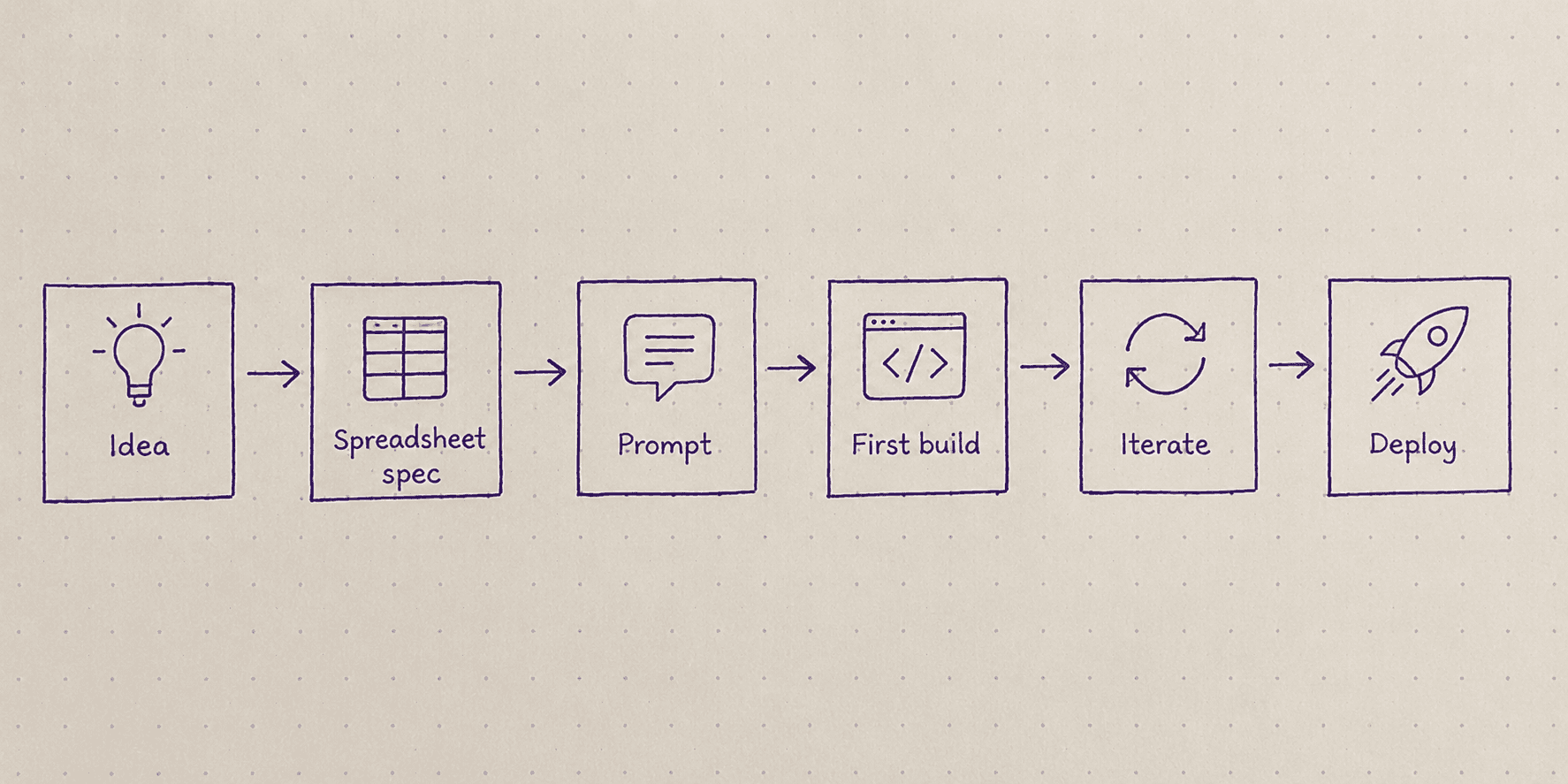
What surprises most beginners is that the learning curve is mostly about learning to communicate what you want clearly, not about learning to code. It's closer to product management than engineering.
Common mistakes beginners make when starting with vibe coding
I made most of these. You don't have to.
Prompting too vaguely. "Build me an app for my business" tells the AI nothing useful. The more specific your description — users, actions, data, flows — the more the first output resembles what you actually wanted. Vague prompts produce generic outputs that require rounds of correction, compounding over time.
Skipping the spec stage. Building before you've thought through what you're building is how you end up pivoting the AI halfway through and ending up with a Frankenstein codebase. Fifteen minutes in a Google Sheet before the first prompt is worth two hours of iterating after a confused build.
Mistaking a demo for a product. Some platforms produce impressive-looking first outputs that fall apart at the first sign of real use — no persistent data, mock authentication, no real backend. It's worth understanding, before you invest time building, whether the platform is generating real infrastructure or a prototype.
Not iterating. The first output is rarely the final product. Beginners often get discouraged by an imperfect first build and interpret it as vibe coding not working. The workflow is inherently iterative. The first build is the starting point, not the destination.
Treating it as all-or-nothing. You don't have to rebuild your entire product concept in one session. Most of my best builds started with a single feature, worked when that feature worked, and then expanded from there. The MVP discipline — my operations professor at business school, Dr Wendy Alderton, used to say "strategy without execution is hallucination" — applies doubly here. Ship the smallest thing that tests your assumption.
When vibe coding is the right choice (and when it isn't)
This is the 2x2 I keep drawing on whiteboards and then half-apologising for, but it's genuinely useful.
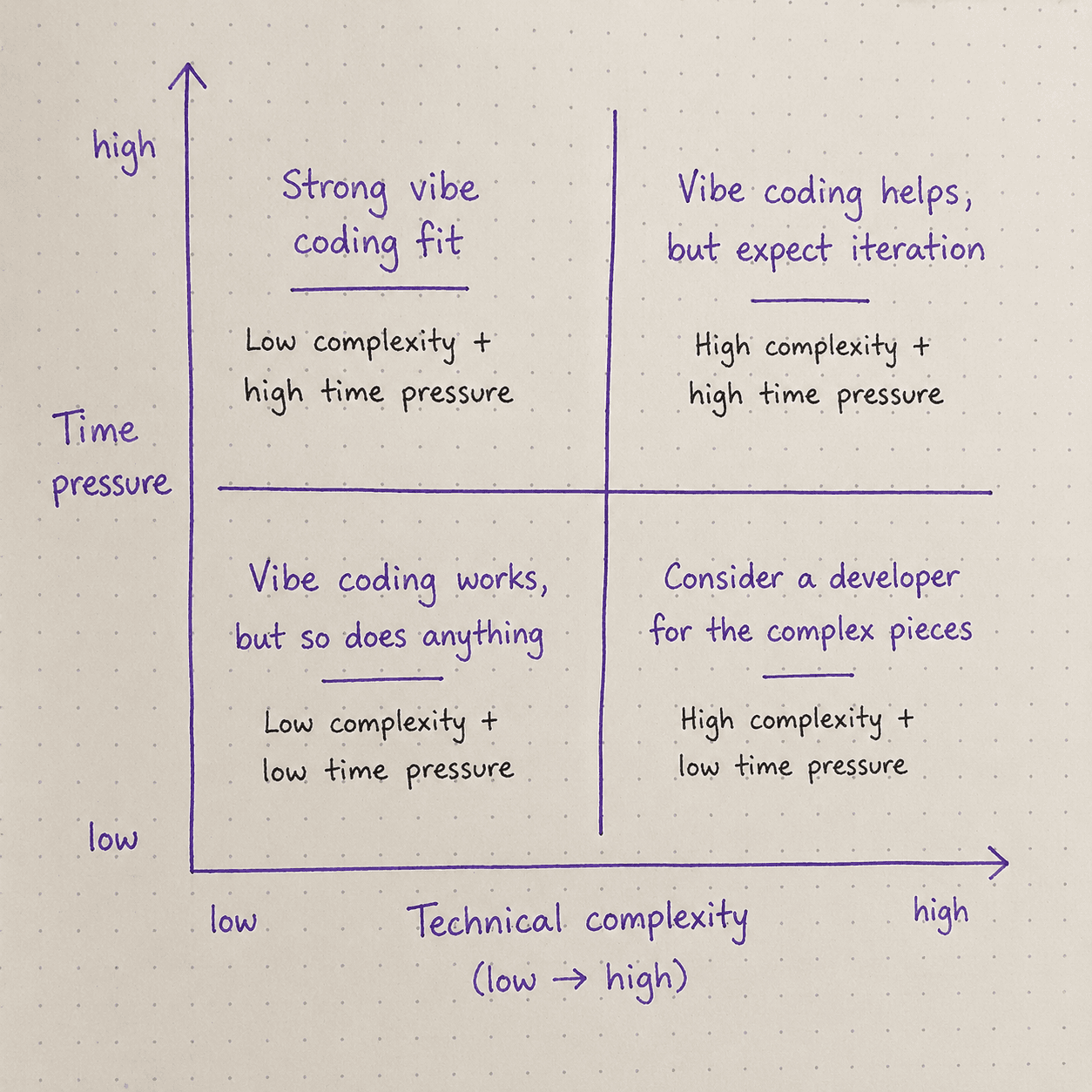
Vibe coding is the right choice when:
You're validating whether an idea has users before investing in a full build
You need a working product, but don't have a technical co-founder or a meaningful development budget
The core value of your product is in the user experience and business logic, not in a proprietary algorithm
The speed of first user feedback matters more than perfection
You're a PM or consultant who needs a prototype that functions, not just a Figma mock
Vibe coding is not the right choice when:
Your product's core value lives in a custom algorithm that doesn't map to standard patterns
You have very specific design requirements that require pixel-level control
The app needs to integrate deeply with poorly-documented legacy systems
You need to maintain and extend the codebase yourself without ever involving a developer again (though code ownership means you can always bring a developer in later)
The honest version: vibe coding is not a replacement for technical skill in every situation. It is a genuine replacement for technical skill in far more situations than most people expect.
Frequently asked questions
Do I need to know how to code to use Vibe coding?
What's the difference between vibe coding and no-code platforms like Bubble or Webflow?
Can vibe coding build apps that handle real users and real data?
How long does it take to build an app with Vibe Coding?
What happens if I need to customise the code later?
Is vibe coding suitable for building a startup MVP?
Abhishek writes about the non-technical founder journey — building real products without a technical co-founder, the false starts that taught him more than the wins did, and what the current generation of AI-building tools actually makes possible. He works as a strategy consultant and runs a small SaaS product on the side.