Vibe coding means describing the app you want to build in plain English, and having an AI system generate the complete working software, including the database, login system, payment integration, and everything else, without you needing to write a single line of code. The term was coined by Andrej Karpathy in February 2025, but the capability it describes had been quietly becoming real for the year or two before anyone named it. If you've ever had a product idea and hit a wall because you couldn't code, or spent money on a developer to build something that didn't come out right, vibe coding is worth understanding properly. This article explains what it actually is, what it actually does, and what it genuinely requires from you.
What vibe coding means in plain English
Think about what it means to hire a skilled professional for a task you don't know how to do yourself. When you need a house built, you don't learn architecture and construction — you describe what you want, and you work with someone who translates that description into a structure. The communication is in your language. The technical execution is theirs.
Vibe coding works on the same principle, except that the skilled professional is an AI system, the timescale is minutes rather than months, and what it builds is software.
You write a description: "I want an app where freelancers can list their services, clients can browse and book them, payments happen through Stripe, and both sides have accounts with a dashboard." The AI reads that description, works out what the application needs a database to store users and bookings, an authentication system for the accounts, a payment integration, the screens and flows for both sides, and generates it. All of it. You get a working URL.
The word "vibe" refers to the nature of the interaction. You're communicating intent and feel, not formal instructions. You don't need to know what a database is, how authentication works, or what an API does. You need to know what you want to build and be able to describe it. These are very different skill requirements, and the difference is the entire point.
The old way vs the new way: what changed
Until very recently, building software required one of three things: learning to code yourself (a multi-year investment), hiring a developer (expensive, slow, and often frustrating when the communication gap between what you described and what got built was wide), or using a visual website or app builder with a fixed ceiling.
That third option — platforms like BackStract, Bubble, Webflow, or Wix gave non-technical people some ability to build without coding. But they worked by providing you with a library of prebuilt components to assemble. You could make something that looked like an app, but the ceiling was hard: whatever the platform provided, that was your limit. Anything beyond that required a developer.
What changed is that AI language models became good enough, specifically around 2023 and 2024, to incorporate the full context of a software project into their reasoning, rather than just generating isolated code snippets. Before this point, AI could help a developer write a specific function. After this point, AI could take a product description and generate an entire coherent system: frontend, backend, database, authentication, integrations, deployment configuration — all fitting together correctly.
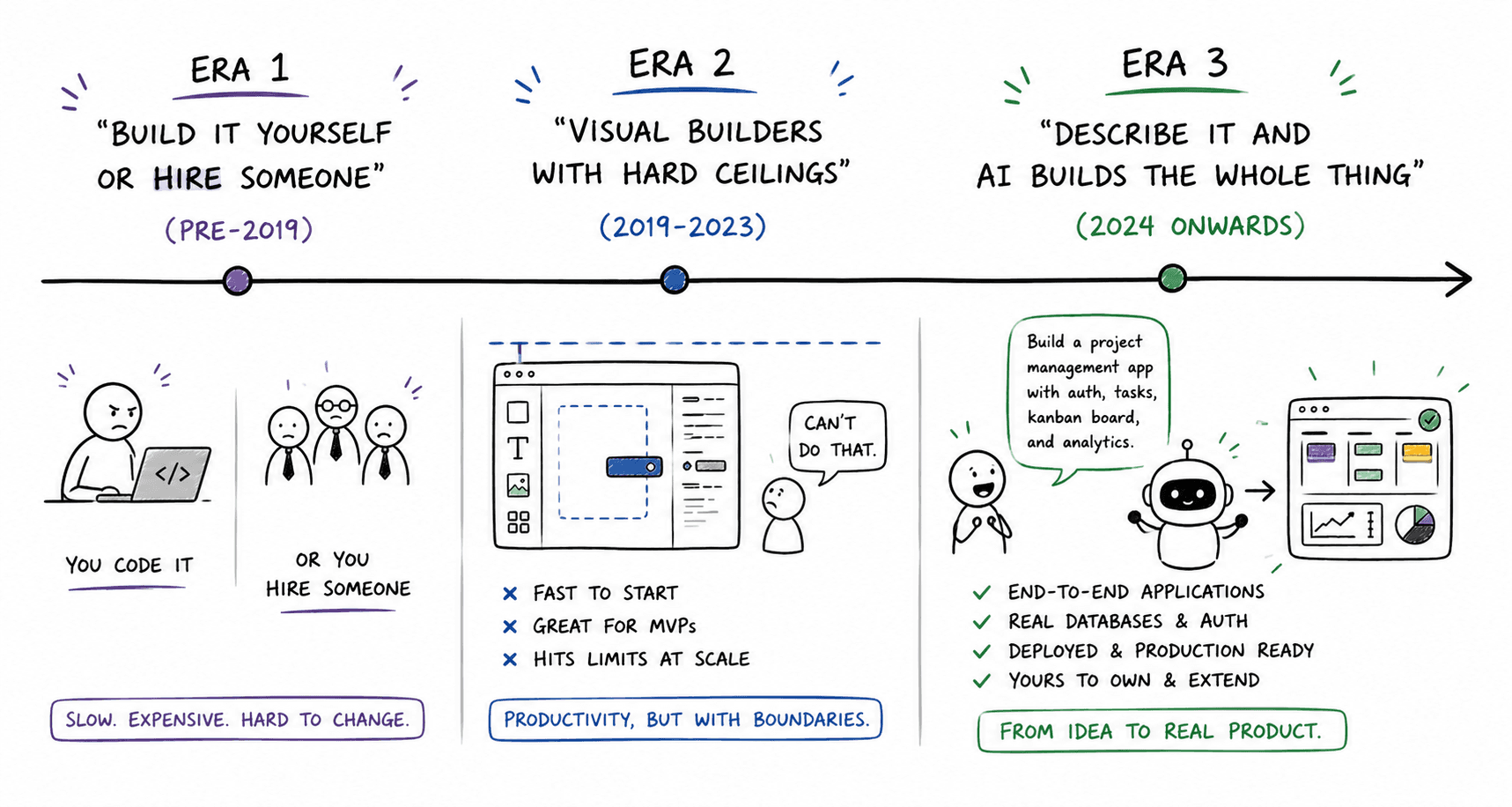
This is not an incremental improvement on the visual builder era. It's a different capability entirely. The output is real software, not an arrangement of components inside someone else's platform.
What you actually do when you vibe code (the process, step by step)
The process is simpler than most people expect, and slightly more iterative than the marketing for these tools implies.
Step one: Describe your application. You write out what you want to build — as a paragraph, a list, or a rough product description. The more specific you are, the better. "A booking app" is a starting point. "A booking app for yoga instructors, where students can see the instructor's weekly schedule, book a specific class, pay upfront via card, and get a confirmation email" is a brief. The AI works from whatever you give it, but specificity narrows the gap between what you imagined and what it generates.
Step two: Review the first output. The AI generates a first version. This usually takes a few minutes. You'll have a working application you can open in a browser and interact with. At this stage, you're checking whether the core structure matches what you had in mind — are the right screens there, does the flow make sense, does the data model seem right?
Step three: Refine through conversation. This is where most people underestimate the process. Vibe coding is iterative. You describe what you want changed — "the booking confirmation screen should also show the instructor's cancellation policy" or "I need users to be able to upload a profile photo", and the AI updates the application. This back-and-forth is normal and expected. It's not a sign the tool failed; it's how the tool is designed to be used.
Step four: Test with real scenarios. Before showing the application to anyone else, walk through it as a user would. Create an account. Try the core flow. Find the gaps. Then describe the fixes back to the AI.
Step five: Deploy. On good platforms, the application is deployable from the start — you get a live URL you can share. This is the point at which a prototype becomes a product.
What the AI is building behind the scenes (explained without jargon)
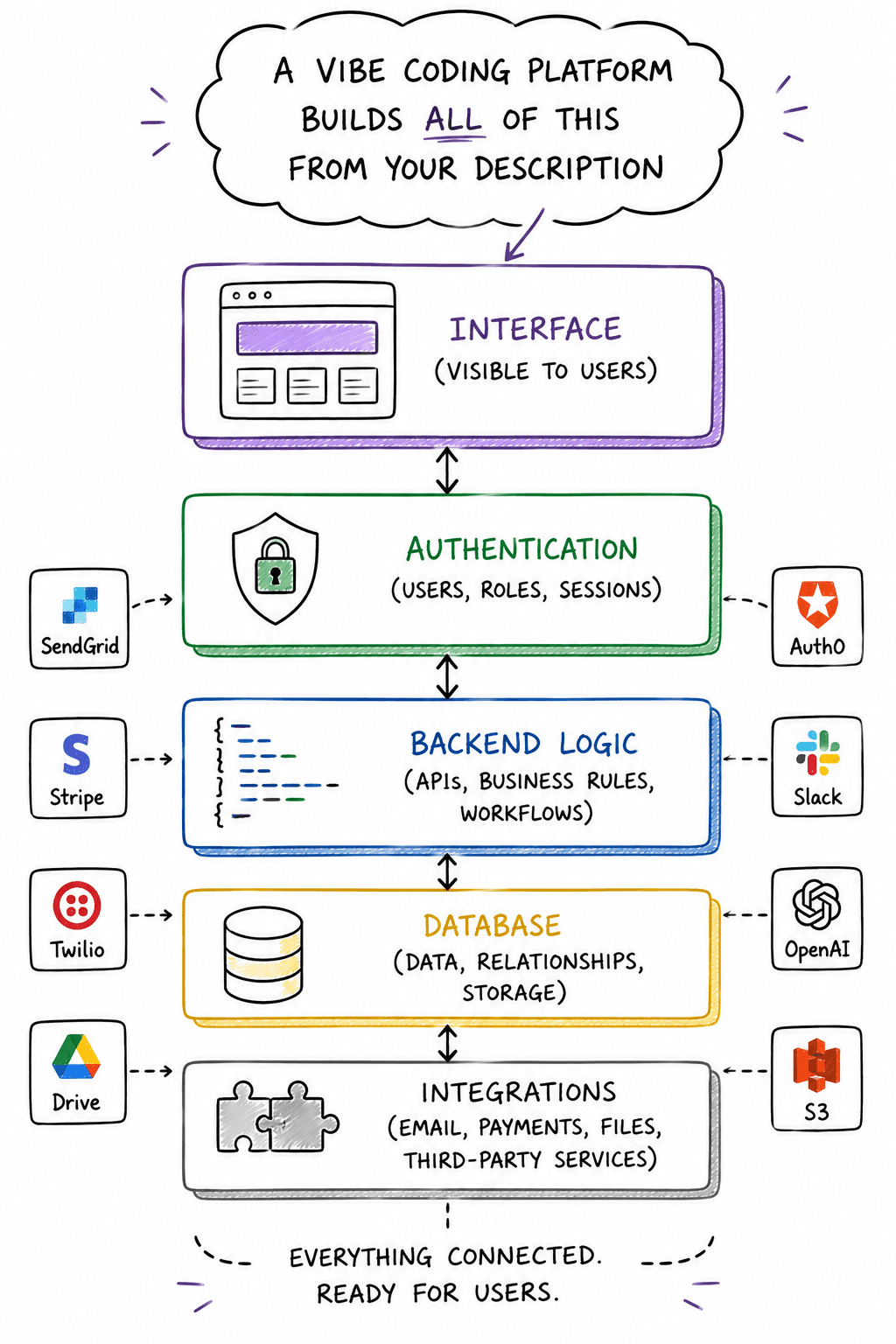
When you describe an application to a Vibe coding platform, the AI is generating several interconnected layers simultaneously. Non-developers don't need to understand how to build these layers, but understanding what they are helps you describe what you need more accurately.
The interface — everything you see and interact with. Buttons, forms, screens, navigation. This is what most people picture when they think of an app.
The database — where the application remembers things. User accounts, orders, bookings, messages — any information that needs to persist from one session to the next lives in the database. Without a real database, an application forgets everything the moment you close it. This is one of the most important questions to ask about any vibe coding platform: Does it generate a real, persistent database?
The authentication system — the login and account management layer. Creating accounts, verifying passwords, managing who is logged in and what they're allowed to see. This is more complex than it looks from the outside, which is why early no-code tools often implemented it poorly.
The backend logic — the rules the application follows. What happens when a user submits a booking? How a payment gets processed. Who gets notified when something changes? This layer is invisible to users but is what makes an application actually do something, rather than just display information.
The integrations — connections to external services. Stripe for payments. Email providers for notifications. Calendar services for scheduling. Each integration requires code that speaks the external service's language correctly.
A vibe coding platform that generates all of these layers is called a full-stack platform. One that generates only the interface — and either simulates or skips the rest — is a frontend generator. The distinction matters enormously for anyone building something real.
What non-developers can realistically build with Vibe coding today
The honest answer, based on what's actually been shipped: more than most non-developers expect, within a defined range.
Applications that work well: internal tools for teams that currently run on spreadsheets. Client portals. Booking and scheduling systems. Simple marketplaces. Task and project management tools. Membership platforms. Customer-facing dashboards. Anything where the core requirements are accounts, a database, forms, and some kind of transaction or workflow.
I've spoken to non-technical founders who have shipped products using these tools — not prototypes, but running applications with paying users. One was managing a home services marketplace. Another had built a client reporting tool for a consulting practice that had previously been sent as weekly email attachments. Neither of them wrote any code.
Platforms like Mayson are designed specifically for this: a non-technical founder describes their first application, and the output is production-grade — real database, real auth, real backend infrastructure — rather than a demo that needs to be rebuilt when real users arrive. Applications like Mandalove and Pitch Pulse were built this way: shipped by non-technical founders, running on real infrastructure, handling real users.
Where the ceiling appears: consumer applications where the design needs to be exceptional (vibe coding produces functional interfaces, not award-winning ones), applications requiring highly specific custom logic that doesn't follow standard patterns, and anything in a regulated domain where security requirements need professional review.
The skills you still need (even though you're not coding)
Vibe coding removes the syntax barrier. It does not remove the barrier to thinking. This is worth stating clearly because the marketing for some of these tools implies you can arrive with a vague idea and leave with a finished product. You can't.
Product clarity. You need to be able to describe your application in detail: what it does, who uses it, what data it stores, and its core workflows. This is not a coding skill — it's the same thinking that goes into a product brief or a specification document. Founders who have done this thinking before opening a Vibe coding platform get dramatically better results than those who haven't.
User flow thinking. How does a user move through the application? What happens when they sign up? What's the first thing they do? What happens if something goes wrong? These questions don't require technical knowledge, but they require you to think systematically about experience. The AI will make assumptions if you don't specify — and the assumptions are not always the ones you'd make.
Iteration patience. The first output is rarely final. Treating vibe coding as a dialogue — describe, review, refine, repeat — produces far better results than expecting a single prompt to produce a finished product. Founders who understand this up front don't get frustrated; they use its iterative nature as part of the design process.
Basic digital literacy. You should be comfortable using web applications, have a conceptual sense of what "an account" means, and understand roughly what happens when you make a payment online. You don't need to know how any of this is built — but understanding it as a user helps you describe what you want to build with accuracy.
What you genuinely don't need: programming knowledge of any kind. Understanding of databases, servers, or infrastructure. Ability to read or write code. These barriers are gone.
Common misconceptions and what vibe coding can't do yet
"It's just a fancy website builder." The output of a vibe coding platform is a real codebase — not an arrangement of components inside a proprietary editor. A website builder gives you a Wix site. A vibe coding platform provides a working application with a database, authentication, and backend logic. You can take the codebase to a developer and extend it. You can deploy it anywhere a standard application can run. These are fundamentally different things.
"The AI will figure out what I mean." It will try. It will also make assumptions, fill gaps, and occasionally misunderstand. The more precisely you describe what you want, the less the AI has to guess. Vague prompts produce generic results. Specific prompts produce specific results. This is not a limitation to be fixed — it's a property of how language works.
"If it works in a demo, it's production-ready." This depends entirely on what the platform generated in the backend. A frontend with a simulated database works in a demo. When a real user signs up and expects to find their data the next time they log in, they don't. Explicitly ask whether the platform generates a real, persistent database before assuming production readiness.
"I can build anything with this." Vibe coding handles standard application patterns reliably. It struggles with genuinely novel logic, complex real-time systems, applications requiring fine-grained design control, and anything in a security-critical domain. These limitations are real, narrower than sceptics suggest, and worth knowing in advance rather than discovering mid-project.
"If something breaks, I'm stuck." On platforms that give you code ownership, you're not locked in. You can bring a developer in at any point — they'll be working with standard code in standard frameworks, not a proprietary system they need to learn. The AI also handles many iterations and fixes through conversation; the first instinct when something isn't right should be to describe the problem rather than panic.
Frequently asked questions
Do I need any technical background to use Vibe coding?
Is vibe coding the same as website builders like Wix or Squarespace?
Can I build a real business on a vibe-coded app, or is it just for testing ideas?
What happens if the AI builds something wrong — can I fix it without knowing code?
How much does vibe coding cost compared to hiring a developer?
Will I own the code, or am I locked into a platform?
Shashi has covered developer tools and the no-code/low-code space for eight years. She writes from Delhi, interviews founders at the tools that shape this category, and runs a moderately-read newsletter that takes taxonomy seriously. She has never built a production app herself — which she considers useful context when explaining things to people who haven't either.