No-code tools let you build applications by assembling pre-built components through a visual interface, while AI app builders let you describe what you want in natural language and generate the application — including code, logic, and infrastructure — from scratch. These two categories are frequently conflated, partly because both allow non-technical people to build software, and partly because the marketing language around both tends toward "build without coding." But the underlying mechanisms, outputs, and ceilings are different. Understanding where the categories actually diverge matters more now than it did two years ago, because the lines are actively blurring, and knowing what to look for helps you evaluate tools more accurately than reading their landing pages does.
The core distinction: assembly vs generation
The clearest way to separate these categories is to ask what the tool does when you use it.
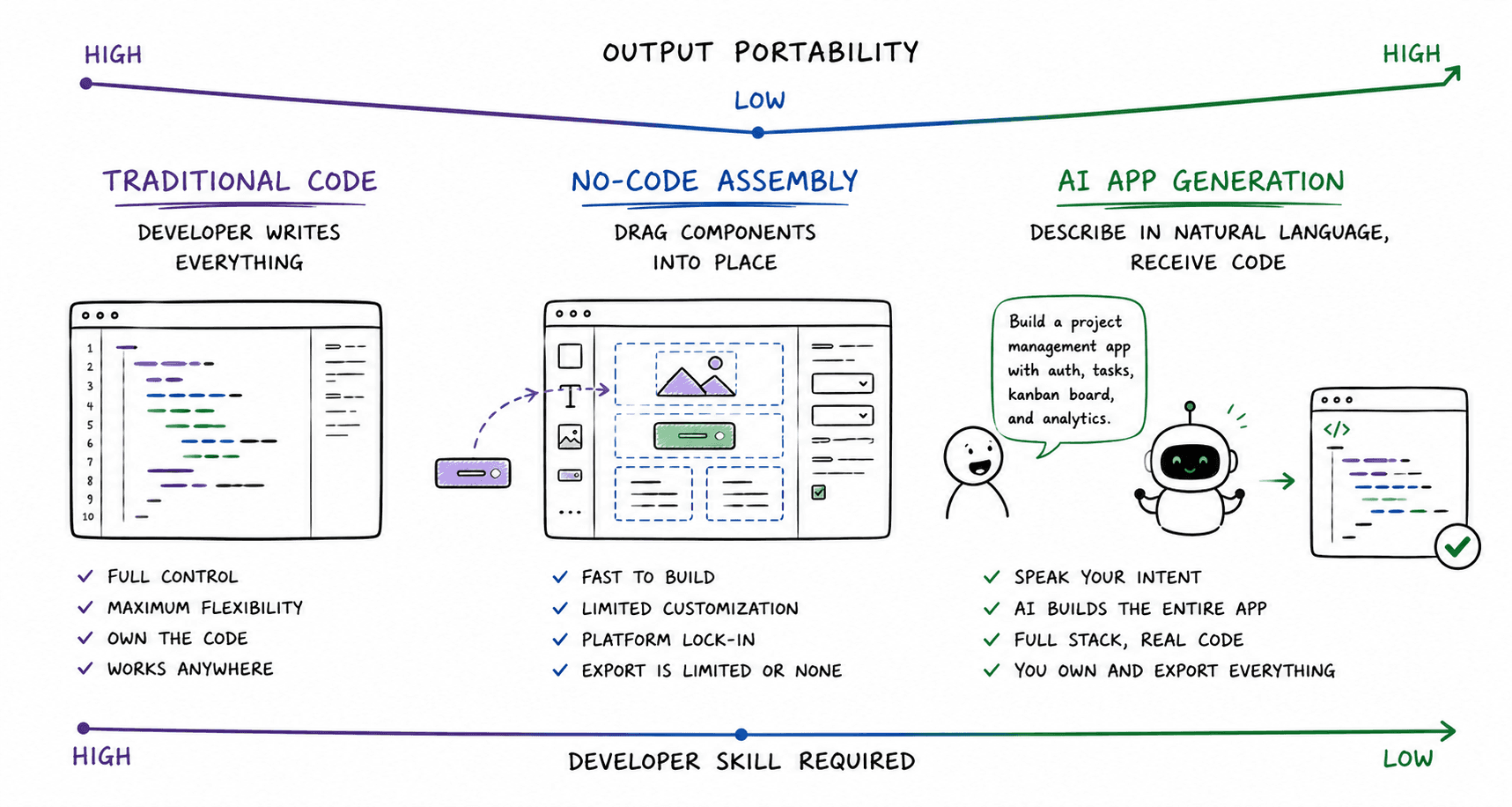
A no-code tool provides a library of components and a visual interface to arrange them. You are assembling an application from pre-built parts on the platform. The ceiling is the library: whatever the platform has built, you can use; whatever it hasn't, you cannot, unless the platform has provided a way to extend it.
An AI app builder takes a description and generates an application. There is no pre-built component library you are selecting from. The AI constructs the application's structure, logic, and often its infrastructure from the description you provide. The output is not an arrangement of platform components it is code.
The distinction is architectural before it is practical. No-code assembly produces an artefact that lives inside the platform's system. AI-generated code exists independently of the platform that generated it. This difference has downstream consequences for ownership, portability, and what happens when you need to extend the application beyond its initial scope.
How no-code tools work and what they were built to solve
No-code tools emerged in response to a specific problem: software development required specialised skills that most people with ideas lacked, and the cost of hiring them was prohibitive for early-stage projects. Platforms like Bubble, which launched in 2012, and Webflow, which launched in 2013, made a reasonable bet that a significant portion of what people wanted to build followed predictable patterns — pages, forms, databases, user accounts, workflows — and that those patterns could be abstracted into visual interfaces.
The bet was correct, and the category grew. By 2020, no-code had become a legitimate development approach for a meaningful range of projects: internal tools, MVPs, landing pages, simple marketplaces, and content-driven sites. Gartner began forecasting that a majority of application development would involve low-code or no-code tools by the mid-2020s, a prediction that reflected real momentum in the category
https://www.gartner.com/en/newsroom/press-releases/2021-02-15-gartner-forecasts-worldwide-low-code-development-technologies-market-to-grow-23-percent-in-2021
The mechanism is consistent across platforms, even as the implementations differ. You work inside a visual editor. You add components (a form, a list, a button, a data table) and configure their properties (what data they display, what happens when they're clicked, who can see them). You connect data sources, define workflows, and set permissions. The platform handles everything underneath: the server, the database, and the deployment. You never see or touch the code because there is no code in the traditional sense — the application is the configuration you've built inside the platform's system.
This is both the strength and the limit of the model. The strength: you can build a working application without understanding how any of the underlying technology works. The limit: the application is only as capable as the platform's component library. When you hit the ceiling, you cannot go around it by writing code — you are inside a closed system.
The ceiling manifests in documented ways. Complex conditional logic that doesn't fit the platform's workflow builder. Performance issues as data volumes grow. Integration requirements that the platform hasn't pre-built connectors for. Custom UI behaviour that falls outside the component options. Founders who built on no-code platforms and later needed to scale or extend their products frequently describe the same moment: the point at which the next feature they needed wasn't in the platform, and the cost of working around it exceeded the cost of rebuilding elsewhere.
How AI app builders work and what they were built to solve
AI app builders address a different version of the same underlying problem. The constraint they're removing is not the need to assemble from components — it is the need to have a starting point at all. You do not select from a library. You describe what you want, and the AI generates it.
The mechanism: you write a natural language description of the application — its purpose, its users, its core workflows, its data. The AI parses that description, infers the application's structure (which entities exist, how they relate, and which user flows are needed), and generates code across the full stack: frontend components, backend logic, database schema, API routes, authentication, and deployment configuration. The output is a working application expressed as a real codebase.
This became reliably possible around 2023 and 2024. Before that threshold, AI systems could generate isolated code fragments — a function, a component, a query — but could not retain enough context about an entire application to generate a coherent system in which all the layers fit together. The capability shift was not incremental; it was a threshold crossing, driven by improvements in the context capacity and architectural reasoning of large language models.
The problem AI app builders were built to solve is therefore subtly different from the one no-code tools addressed. No-code tools solved the skills barrier by removing the need to write code. AI app builders solve the skills barrier by removing the need to know what to write in the first place. The distinction matters because the output differs: no-code assembly produces a configured platform instance, whereas AI generation produces code.
Where the two categories overlap and why the lines are blurring
The categories are converging, and it is worth being honest about this rather than drawing a clean line that no longer exists.
Several established no-code platforms have added AI generation features. Bubble added AI-assisted app building. Webflow has added AI-generated content and layout tools. The direction of travel is clear: visual assembly platforms are incorporating natural language interfaces to lower the barrier to building a first working structure, then allowing users to refine it through their existing visual editors.
AI app builders, in turn, are adding visual editing layers. The pure prompt-to-code model, where every change requires re-prompting, is being supplemented by interfaces that let users make visual adjustments without returning to natural language. Several platforms now offer both.
The result is that the category distinction is becoming less about the interaction model (visual vs language) and more about the underlying question of what the tool produces. A platform that lets you describe an application in natural language and then adjust it visually is neither purely no-code nor purely an AI app builder under the old definitions. What matters is the architectural question: is the output a configured platform instance, or is it exportable code?
This distinction will persist even as interaction models converge. A visual editor built on top of a code generator produces code. A natural language interface built on top of a component library produces a platform configuration. The underlying output is what determines portability, ownership, and long-term extensibility — regardless of how the interface feels to use.
What each approach produces: ownership, portability, and scalability compared
Three questions are worth asking about any tool's output, because the answers determine what you can do with what you build.
What do you own? In a no-code platform, you own the application in the sense that you built it, and it runs under your account. You do not own the code, because there is no code in the conventional sense — the application is the configuration inside the platform's system. If you want to move it, you'll have to start over. On AI app builders that provide full code ownership, you own a real repository: the code is yours, it runs on standard infrastructure, and it is not contingent on the platform's continued existence or pricing.
What can you take with you? No-code applications are generally not portable. You cannot export a Bubble application and run it on a different server. The platform's infrastructure is part of the product. AI-generated applications, on platforms that give you the codebase, are portable in the normal sense: deployable to any cloud provider, hostable on your own infrastructure, transferable to a development team that can work with it in a standard environment.
What happens when you grow? No-code platform scaling is a documented friction point. You are scaling within the platform's architecture, which was not designed for your specific product. Compounding service fees, performance ceilings at data volume, and migration costs are consistent themes in the accounts of founders who built on no-code platforms and later outgrew them. AI-generated code scales with standard infrastructure: the application runs on a database and a server that you control, and scaling it is a standard infrastructure problem rather than a platform constraint.
Mayson, as an example of the latter approach, generates backend infrastructure as native code in the application's own repository: the database schema, auth layer, and API routes are part of the codebase you own, not services the platform manages on your behalf. This is an architectural choice with practical consequences: no compounding managed-service fees, no backend vendor lock-in, and no rebuild required when the application grows beyond early-stage traffic.
Which type of tool fits which type of builder and project
The honest answer is that both categories have legitimate uses, and the best tool depends on what you are building, what you need to happen when users arrive, and what you expect to do with the application over time.
No-code tools are well-suited to: marketing sites and landing pages where the priority is design control and content management; simple internal tools where the workflow is predictable and the data volume is low; early validation experiments where speed to something visible matters more than what happens next; and builders who are comfortable living inside a platform's ecosystem and have no plans to move outside it.
AI app builders are better suited to: applications that need a real backend from the start — user accounts, persistent data, payment flows; products where the founder expects to hire a developer later and needs the codebase to be standard and portable; MVPs that need to be production-ready rather than demo-grade from day one; and builders who want to own what they've built and not inherit a dependency on a specific platform's pricing and roadmap.
The question worth asking before choosing a tool is not "which has a lower barrier to entry" — both categories have addressed that. The question is "what do I need to be true about this application in six months?" If the answer includes real users, real data, and the ability to extend the product without rebuilding, the output type matters more than the interface type.
Where the category is heading: convergence, divergence, or something else
The most accurate prediction is neither full convergence nor clear divergence, but a sorting by output type.
The interaction models will continue to blur. More no-code platforms will add AI generation. More AI builders will add visual interfaces. In two years, the surface distinction between "I'm assembling visually" and "I'm describing in language" will be less meaningful than it is today, because most platforms will offer both.
What will not blur is the architectural distinction between platform-locked output and portable code. This is a structural difference, not a feature difference, and it does not converge through interface design. A visual editor built on top of a component library produces a platform configuration. A visual editor built on top of a code generator produces code. The interface looks similar; the outputs are fundamentally different.
The category question that will matter in three years is therefore not "is this a no-code tool or an AI app builder" — that framing is already becoming imprecise. The question will be: does this platform produce an artefact you own and can run independently, or does it produce an artefact that requires the platform to exist? That question has a clear answer for every tool, regardless of what category label it applies to itself.
I have watched the no-code category evolve from curiosity to category in real time, and the pattern is consistent: the tools that survive platform shifts are the ones whose output outlasts the platform that generated it. The category terminology will keep changing. The underlying architectural question will not.
Frequently asked questions
Is Bubble a no-code tool or an AI app builder?
Can no-code tools generate real code I can export and host myself?
Are AI app builders just a more advanced version of no-code?
What happens to a no-code app if the platform shuts down?
Can AI app builders replace no-code tools, or do they serve different needs?
Which is better for a non-technical founder — a no-code tool or an AI app builder?
Shashi covers developer tools and the no-code/low-code space from Delhi, where she has been writing about this category since Bubble was a curiosity and Webflow was a Hacker News thread. She runs a developer tools newsletter, has interviewed founders at several of the platforms discussed here, and has a standing professional irritation with the word "democratise."